Team and design system
Building the team, and the system it ran on
When I started at LinkedIn, there was one other designer, who had joined three months before me. I helped grow it into a team of six, with a shared way of working, a creative standard and a design system.
Building the team
2 → 6designers: from me and one other designer who had joined three months earlier, to a team of six.
- 01HiredInterviewed designers to grow the team
- 02Set a workflowHelped build the team’s design workflow
- 03Set the barEstablished a creative standard others followed
- 04Chose a systemHelped find the design system we adopted: MUI, customized into MUI Mercado
- 05Wrote it downDocumentation on best practices
- 06Taught UXShowed engineering and PMs what UX could do for their products
MUI Mercado
We took the open-source MUI design system and customized its colors and branding to match LinkedIn, so our internal tools could look and work like one family without building a library from scratch. We built it as a design team, together.
MUI Mercado in one product
- 38MUI Mercado components in Merlin’s MVP
- 5,484component instances across its screens
- 100%of the presentation studio built from the library
Anatomy of a screen
Merlin’s presentation studio, built entirely from MUI Mercado components. Hover or tap a number.
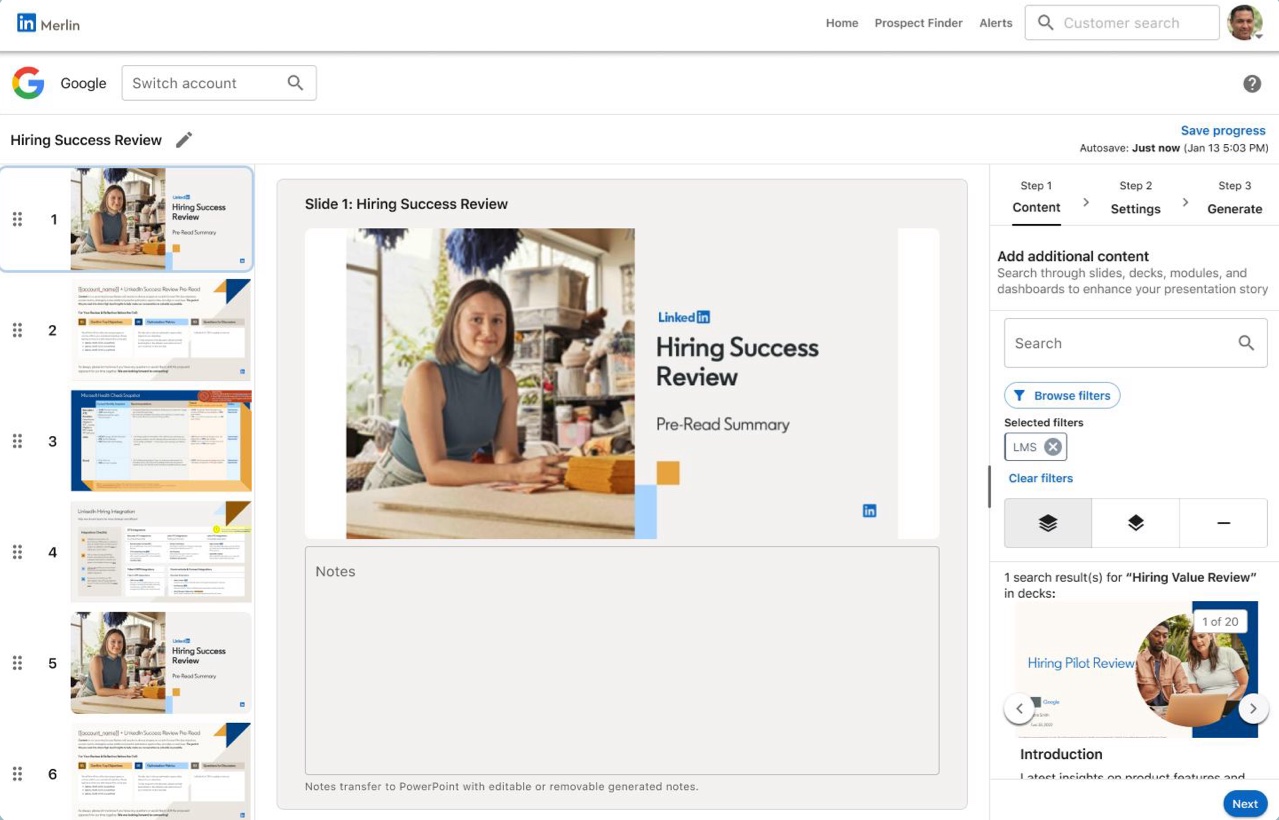
- 1App bar and toolbarwith the LinkedIn logo lockup the team added
- 2Search fieldtext field with an icon
- 3Tabsthe three steps of the flow
- 4Multiline text fieldslide notes
- 5Search with icon buttoncontent search
- 6Outlined buttonBrowse filters
- 7Chipa removable filter
- 8Toggle button grouphow results are shown
- 9Card with mediaa search result
- 10Contained buttonNext
What Merlin used most
Instances in the Merlin MVP prototype’s Figma file. Checkbox includes checkboxes with labels.
How the library grew without the noise
As our products evolved, new needs came up. Instead of adding every one-off, we brought each one to the design team to decide whether it belonged in the library.
- 1A product needs something newA designer runs into a pattern the library doesn’t cover.
- 2Bring it to the teamThe design team reviews it together.
- 3aWorth it for everyoneIt joins the library, so every product can use it.3bOnly one product needs itIt stays local, and the library stays lean.